Terminal experience
RAGdoll is a fullscreen, conversation-first terminal application. It borrows proven interaction patterns from the official Codex CLI, Claude Code, and GitHub Copilot CLI while retaining an independent research workflow and minimal M2 cat identity.
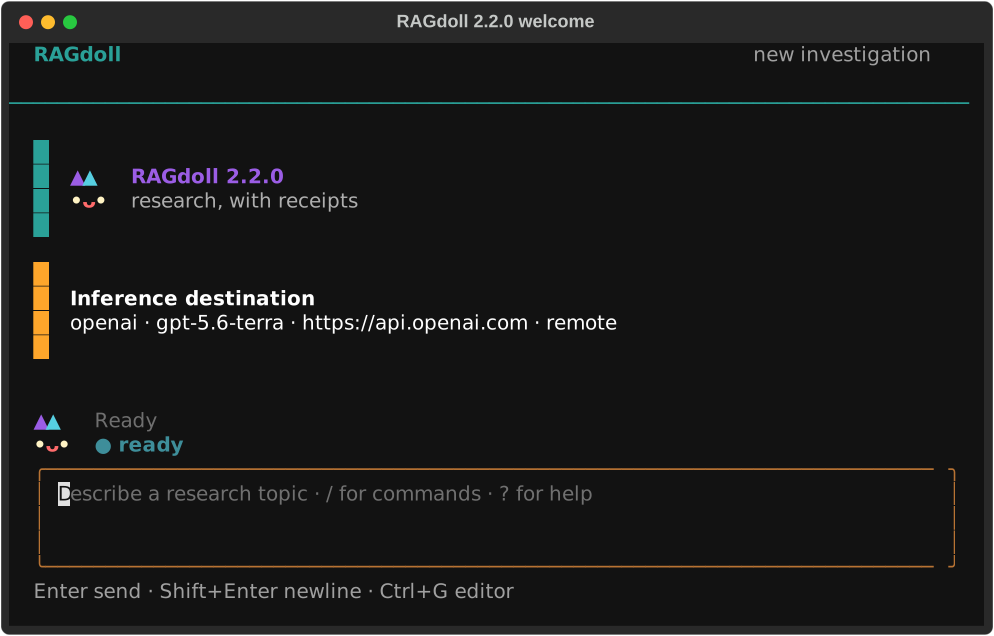
Screen contract
The interface has a compact header, a scrollable conversation timeline, one persistent activity rail,
a multiline composer, and a contextual footer. Plans, paper collections, dossiers, and grounded
answers appear as concise cards. Focus a card and press Enter to open the complete Markdown in a
scrollable overlay. No model reasoning is rendered.
Clarification, plan approval, paper staging, evidence acquisition, and destructive deletion are separate focused dialogs. Long-running provider, scholarly-source, acquisition, and synthesis work runs outside the rendering event loop. A provider operation already in flight is allowed to finish; the UI does not pretend that a blocking remote request was cancelled.
The portable 3 x 2 M2 cat appears in a small welcome lockup and remains in a two-row activity rail
above the composer. It loops a restrained idle animation while ready, switches to continuous
planning, searching, or staging motion for the full operation, briefly acknowledges success or
failure, and then returns to idle. Mascot art is never repeated through the transcript. The cyan,
violet, coral, and cream palette sits on the inherited terminal background. NO_COLOR selects
monochrome output and --no-animation keeps each state static. Windows smaller than 80 x 24 show
a resize overlay. M2 uses standard Unicode and requires no patched terminal font.
Keyboard and commands
| Input | Action |
|---|---|
Enter |
Submit the composer or selected dialog item |
Shift+Enter, Ctrl+J |
Insert a newline |
Tab |
Complete the first matching slash command |
Up, Down |
Recall submitted input when the composer is single-line |
Ctrl+R |
Recall the latest history entry matching the draft |
Ctrl+G |
Edit the draft with $VISUAL or $EDITOR |
Ctrl+L |
Redraw the screen |
Esc |
Close the current overlay or picker |
Ctrl+C |
Clear a draft; press again on an empty idle composer to save and exit |
Ctrl+D |
Save and exit from an empty idle composer |
? |
Open contextual help from an empty composer |
The v2 in-app commands are /plan, /papers, /dossier, /ask, /evidence, /sources,
/export, /purge, /help, and /quit. Type / to see matching commands and descriptions.
Migration from v1
Shell commands and persisted data remain compatible. The following interactive commands changed:
| RAGdoll 1.x | RAGdoll 2.0 |
|---|---|
/candidates, /staged |
/papers, then switch between All and Staged |
/inspect N |
/papers, focus a paper, then press I or choose Inspect |
/stage N, /unstage N |
/papers, then press Space |
/brief |
/plan |
/purge-evidence |
/purge |
Entering a removed v1 command produces a migration hint. Existing investigations and SQLite schema v2 workspaces resume without conversion, and reading-list/dossier export formats are unchanged.
Design references
- OpenAI Codex CLI customization: composer, themes, animations, and external editing.
- OpenAI Codex TUI source: immutable transcript cells, overlays, command dispatch, and derived busy state.
- Claude Code interactive mode: multiline input, history, detail inspection, and terminal-compatible shortcuts.
- GitHub Copilot CLI: discoverable slash commands, compact timelines, semantic mascot colors, and proportionate companion placement. RAGdoll independently uses continuous M2 motion in its dedicated activity rail.
These references define interaction expectations only. RAGdoll does not reuse their names, mascots, source code, or visual assets.